Every invoice in my inbox files itself into a spreadsheet
Three steps in Make: Gmail watches a label, Claude reads the email, Google Sheets writes the row. Here is the exact build — including the part that quietly broke the first time.
What you need first
- A Gmail label called
Invoices, with a few real invoices moved into it. - A Google Sheet named
Invoiceswith these headers in row 1:
Date | Vendor | Invoice number | Amount | Currency | Due date | Email link - A free Make account and an Anthropic API key. The extraction costs a fraction of a cent per invoice.
The scenario — three modules
Invoices. Criteria: all messages. Mark as read: no.
Set the limit to 1 while you are testing, then raise it (for example to 20) so one scheduled run picks up everything new.claude-haiku-4-5, max tokens 500, one message with the role user
and input type Single string. The prompt is below.jsonResponse output into the columns. Make parses the
JSON for you, so there is no need for a separate parsing module.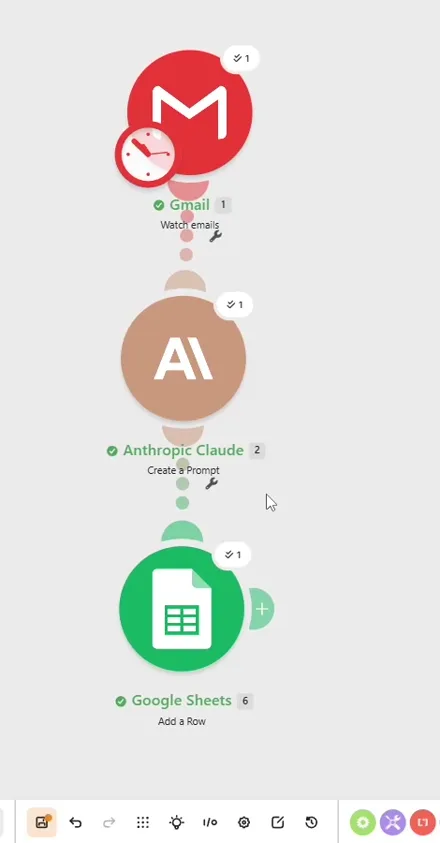
The prompt
Extract invoice data from the email below.
Return ONLY raw JSON. No markdown, no code fences, no explanation.
Keys: date, vendor, invoice_number, amount, currency, due_date
Dates as YYYY-MM-DD. Amount as a number, no currency symbol.
Use an empty string for anything missing.
Start your response with { and end with }. Nothing before or after.
If no invoice date is stated, use the email date.
EMAIL DATE: [Gmail: Date]
SUBJECT: [Gmail: Subject]
BODY: [Gmail: Full text body]The three bracketed values are fields mapped from the Gmail module, not typed as text.
The part that broke
The first run showed three green checkmarks. Everything looked fine. The row in the spreadsheet came out empty.

Claude had wrapped its answer in a markdown code block — three backticks and the word json at the top, three backticks at the bottom. Make could not read that as JSON, so every field arrived empty. Nothing failed loudly. Only the email link, which comes from Gmail rather than from the model, made it into the sheet.
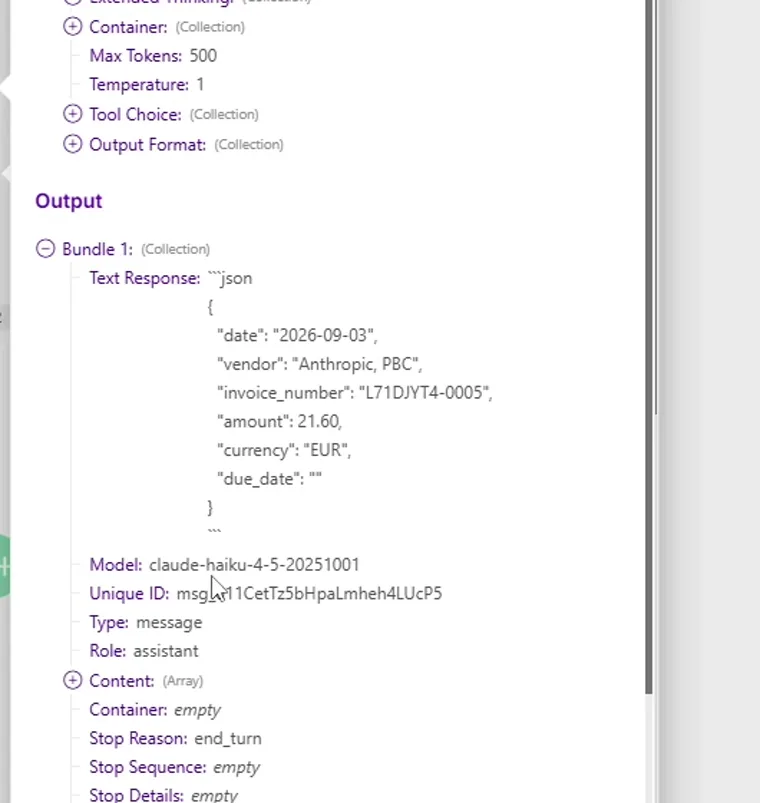
Start your response with { and end with }. Nothing before or after.
This is worth knowing beyond this particular build. Automations that silently produce nothing are harder to catch than ones that throw an error, because the run reports success and you only find out later that the data was never there.
Three more things that cost time
The free plan runs out on the schedule, not on the invoices
Make charges one credit every time the Gmail trigger checks for new mail — even when there is nothing new. The default check runs every 15 minutes, which is about 2,880 credits a month. The free plan has 1,000. Left on the default, it runs out before a single invoice arrives. Set the scenario to run once a day, or every few hours.
The email link opened the wrong account
The link column is built from https://mail.google.com/mail/u/0/#all/ plus the Gmail message ID.
The u/0 means "first signed-in account". If your invoices live in a second Google account, it has to be
u/1 or u/2, or every link opens the wrong inbox.
The date column came back empty
Telling the model to fall back to the email date does nothing unless you actually pass it the email date.
That is why EMAIL DATE is in the prompt above.
What this does not do
The tool
This runs on Make. The free plan gives you 1,000 credits a month. Every module in a run costs one credit, and the Gmail trigger also costs one credit each time it checks for mail. Scheduled once a day, the checks cost about 30 credits a month, which leaves room for a few hundred invoices. Scheduled every 15 minutes, the free plan runs out on the checks alone.
That link gives you the Core plan free for a month, including 10,000 credits. It is an affiliate link, which means TRYDLY earns a commission if you later pay for it. It costs you nothing extra, and it did not decide the verdict — the limitation above is on this page precisely because it is real.